

Every day, businesses, schools, professionals and organisations collect information from people.
But when that information comes through WhatsApp messages, emails, phone calls, spreadsheets and paper documents, it often arrives incomplete, inconsistent and difficult to use.
This creates unnecessary work. Someone has to understand what the person meant, identify what information is missing, ask follow-up questions, reorganise the information and only then begin the actual task.
A well-designed online form can prevent much of this.
It helps you collect the right information in a consistent structure so that a task or workflow can move forward easily.
That is why good form design matters. A form is not merely a digital version of a piece of paper. Done well, it can greatly improve how information enters and moves through a business or automatically trigger the next workflow.
A customer may want to make an enquiry. A candidate may apply for a job. A participant may register for an event. A new employee may submit onboarding details. A vendor may provide company information. A customer may place a service request.
In every case, you need information so that the next step can be initiated easily and automatically.
That is collecting data in a useful and organised way (structured data) using online forms can become useful.
Quick Answer: How Do You Collect Structured Data Using an Online Form?
Structured data is information collected in a defined and consistent format so that it can be organised, reviewed, filtered and used easily.
A practical online form process has nine steps:
- Define the task or workflow that should happen after submission.
- Decide what information is actually required.
- Break that information into clear fields.
- Choose the right field type for each answer.
- Show people what kind of answer you expect.
- Organise the fields in a logical flow.
- Use input validation to reduce avoidable errors.
- Make the form easy to complete on mobile and desktop.
- Make sure the submitted information supports the next task or workflow.
The objective is not simply to create a digital form. It is to turn information coming from different people into consistent, usable records that help work move forward.
What Is Structured Data?
In the context of an online form, structured data is information collected according to a predefined format.
Suppose a business asks prospective customers to send their requirements over WhatsApp.
- “Hi. I need your service sometime next week. Please call me.”
- “Rahul, Bangalore. Need installation Monday afternoon.”
- “Price?”
All three messages contain information. But the structure is inconsistent.
Now imagine that the business uses an online enquiry form with fields such as:
- Name
- Mobile Number
- City
- Service Required
- Preferred Date
- Preferred Time
- Additional Details
Every person is now asked for the same basic information. The business can quickly understand:
Who is asking → What they need → Where → When → Any special requirement
That is the practical value of structured data.
Structured Data vs Unstructured Information
Not all information needs to be structured. Sometimes an open conversation, email or detailed written response is exactly what is required. But when information needs to be processed repeatedly, structure becomes extremely useful.
| Structured Data | Unstructured Information |
|---|---|
| Collected in predefined fields | Arrives in free-form language |
| Consistent across submissions | Format varies from person to person |
| Easier to sort and filter | Usually requires interpretation |
| Easier to compare | Harder to compare consistently |
| Easier to identify missing information | Missing information may not be obvious |
| Useful for repeated workflows | Useful for open-ended communication |
The objective is not to eliminate unstructured information. The better question is:
What information should be structured, and where should we allow people to explain something in their own words?
A good form can contain both.
Forms and Surveys Are Not the Same Thing
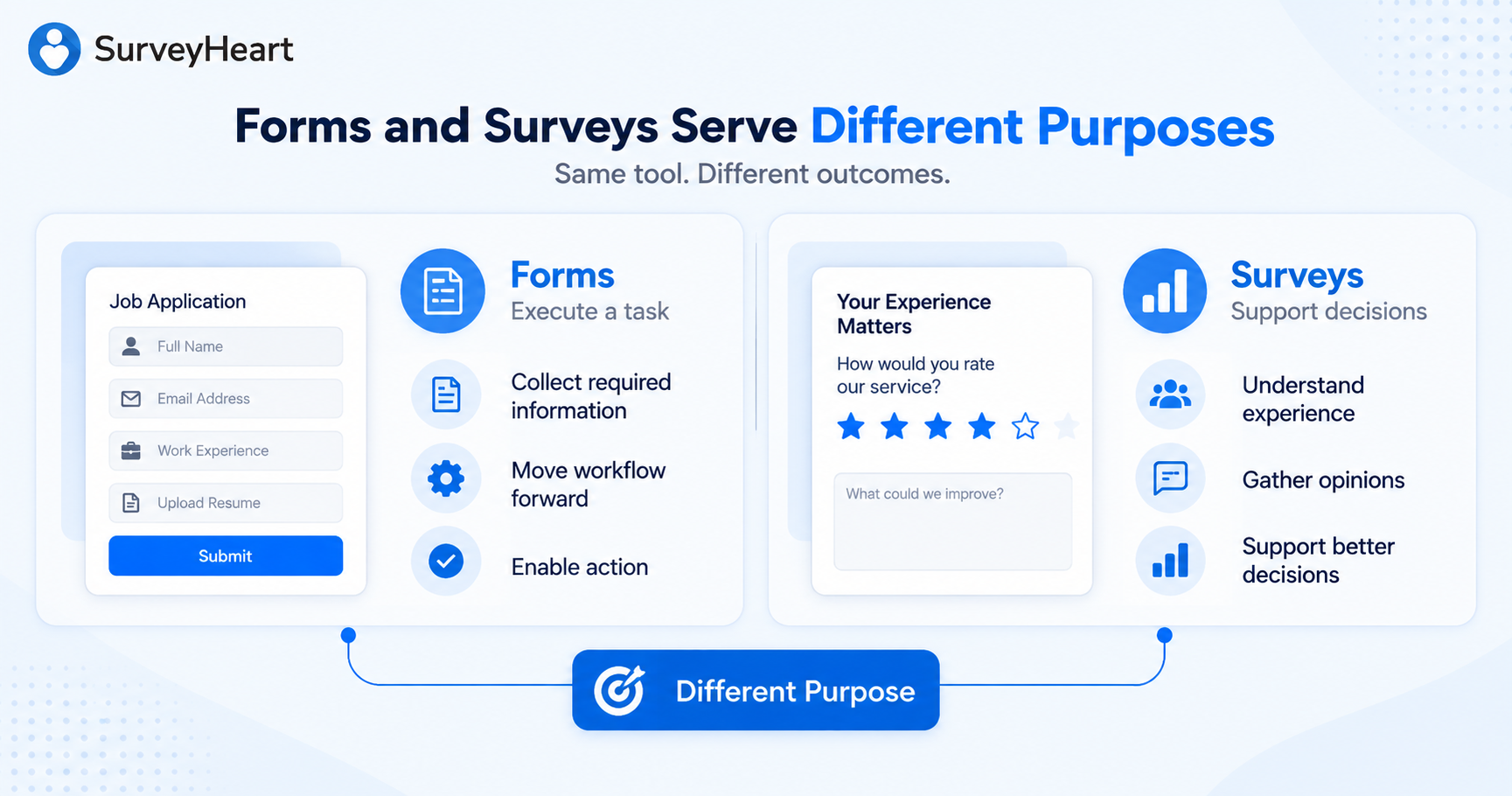
Forms and surveys may look similar because both ask questions and collect responses. But their primary purposes are usually different.
Forms usually collect information needed to execute a task or workflow. Surveys usually collect information needed to take decisions.
Form: Job Application
The organisation needs information about an individual candidate so that the recruitment workflow can move forward.
Survey: Employee Satisfaction Survey
The organisation collects responses from employees so that it can understand their experience and decide what may need to improve.
Form: Event Registration
The organiser needs information about each participant so that registration, communication and event arrangements can be completed.
Survey: Post-Event Feedback
The organiser collects participant opinions so that it can decide what worked and what should change in the next event.
A form often asks: “What information do we need from this person so we can execute the next task?”
A survey often asks: “What information do we need from this group so we can make a better decision?”
Sometimes a process uses both: Registration Form → Conduct Event → Feedback Survey → Decide Improvements. The technology may overlap. The purpose is different.
Step 1: Start With the Task or Workflow That Comes After Submission
One of the easiest ways to create a poor form is to begin by asking: “What fields should I add?” Start one step earlier.
What task or workflow should happen after someone submits this form?
Lead Form
A salesperson should understand the enquiry and know what kind of follow-up is required.
Event Registration Form
The organiser should be able to confirm participation and make the required arrangements.
Job Application Form
The hiring team should be able to decide whether the candidate should move to the next stage.
Vendor Onboarding Form
The business should have enough information to begin evaluating or onboarding the vendor.
Service Request Form
The relevant team should understand the request and know who needs to act.
Before building any form, complete this sentence:
When this form is submitted, we should have enough information to __________.
For example: “When this service-request form is submitted, we should have enough information to assign the request to the right technician and contact the customer to confirm the appointment.”
That immediately helps identify the information the form needs to collect. The workflow determines the data.
Step 2: Decide What Information You Actually Need
Once the purpose is clear, identify the minimum information required to complete the next action properly.
Imagine you are creating an event registration form. You could ask for full name, email, phone number, organisation, job title, age, gender, home address, interests, previous events attended, LinkedIn profile, dietary preference, referral source and reason for attending.
But does the organiser actually need all of this? Perhaps the real operational requirements are only:
- name
- mobile number
- organisation
- attendance confirmation
- dietary requirement, if food is being served
Every unnecessary field creates extra work for the person filling the form. It also creates more information for your organisation to store, protect and manage.
If you cannot explain why you need a field and what you will do with the answer, question whether the field belongs in the form.
Collect what you need. Not everything you could possibly ask.
Step 3: Turn Information Needs Into Clear Fields
Once you know what information is required, convert each requirement into the clearest possible field.
Suppose the objective is to capture a qualified service enquiry. The business wants to know who the person is, how to contact them, where they are located, which service they require, when they need it and any special requirement.
That can become:
- Name
- Mobile Number
- Email Address
- Service Location
- Service Required
- Preferred Date
- Additional Requirement
Good field labels are short and clear.
| Avoid | Use |
|---|---|
| Kindly furnish your telephonic contact particulars. | Mobile Number |
| Please state the geographical location at which the service is desired. | Service Location |
The person filling the form should immediately understand what information is expected.
Step 4: Choose the Right Field Type
Different information should be collected differently. Choosing the right field type improves both the respondent experience and the quality of the data.
Short Text
Useful for names, company names, short identifiers and job titles.
Email Field
Useful when you need a properly formatted email address.
Phone Number
Useful when follow-up requires telephone contact.
Multiple Choice
Useful when one answer should be selected from a known set of choices.
Checkboxes
Useful when several options can legitimately apply.
Dropdown
Useful when there are many predefined choices.
Date and Time
Useful for appointments, availability, events and deadlines.
Number
Useful when the information should be numeric.
File Upload
Useful when someone needs to provide a résumé, document, image or supporting file.
Long Text
Useful when some explanation is genuinely required.
Use structure where structure helps. Use open text where explanation helps.
Step 5: Show People What Kind of Answer You Expect
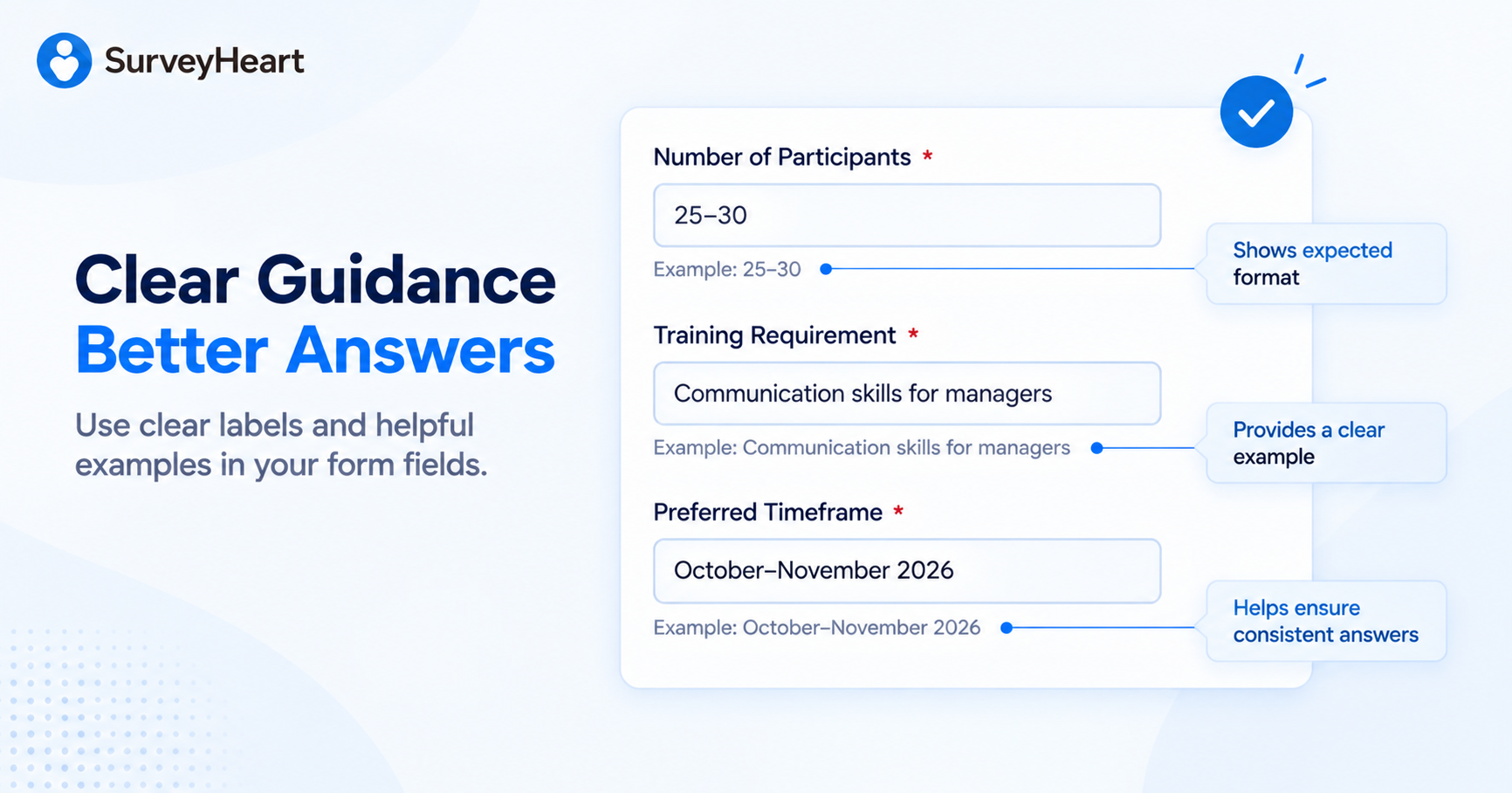
Even a clearly labelled field can leave respondents wondering what they should enter. A simple example can remove that uncertainty.
Suppose your form asks: Number of Participants. The respondent may wonder whether to enter an exact number, an approximate range, words or numbers.
| Field | Helpful example / guidance text |
|---|---|
| Number of Participants | Example: 25–30 |
| Training Requirement | Example: Communication skills for newly promoted managers |
| Preferred Timeframe | Example: October–November 2026 |
| Please briefly describe the problem | Example: The air conditioner starts normally but stops cooling after about 20 minutes. |
| Company Website | Example: www.yourcompany.com |
This small design choice has two benefits. First, it reduces the thinking required from the respondent. Second, it increases the chances that different respondents provide information in a similar and useful format.
Example Text Should Guide, Not Influence
Example text should show the format or level of detail expected, not push the respondent toward a particular answer.
For example, if the user is asked for an approximate budget, the guidance should clarify the expected format without implying that a particular budget is desirable. Likewise, an open-text example should demonstrate the kind of context expected without telling the respondent what opinion to express.
Keep the Field Label Visible
Example text should support a clear field label, not replace it. Clear labels tell people what is being requested. Example text tells them how to answer well.
Step 6: Organise the Form in a Logical Flow
A form should feel like a simple conversation. The order of the questions matters.
Imagine a job application form that begins with “Upload identity proof” before asking “What position are you applying for?” Technically it may work, but the flow feels unnatural.
A better structure often moves from: easy → relevant → detailed → sensitive → confirmation
For example, a service enquiry form might flow like this:
Section 1: About You
- Name
- Mobile Number
Section 2: What You Need
- Service Required
- Service Location
- Preferred Date
Section 3: Additional Information
- Number of Users — Example: 20–25
- Special Requirement — Example: Installation needs to be completed over the weekend.
Section 4: Confirmation
- Consent or declaration
- Submit
Related fields should be grouped together. Longer forms can use sections or pages so the person does not face a wall of fields at once.
Step 7: Use Input Validation to Improve Data Quality
Structure alone does not guarantee clean data. Forms should also reduce obvious errors.
- an email field should expect an email address
- a number field should not accept random text
- required information should not be accidentally skipped
- a date should be collected as a date rather than inconsistent free text
- choices should be predefined where consistency matters
Imagine asking “Which city are you located in?” as free text. Respondents might enter Bangalore, Bengaluru, B’lore, Bangalore City or BLR. All may refer to the same city, but the dataset now needs cleaning.
Where appropriate, predefined choices can create more consistent data. Validation should not make the form difficult. Its purpose is to prevent avoidable errors while information is being entered.
Step 8: Make the Form Easy to Complete
People filling online forms are often not sitting at a desk with unlimited time. They may be using a mobile phone, travelling, standing at an event, responding through a messaging-app link, switching between tasks or completing the form quickly during work.
Every unnecessary obstacle increases the chance that they abandon the form. Before publishing, review it from the respondent’s perspective.
Is the purpose clear?
Tell people what they are filling in and why.
Is the form longer than necessary?
Remove fields that are not required.
Is it obvious what answer is expected?
Use clear field labels and short example text where clarification would help.
Are the instructions understandable?
Use simple language.
Does it work comfortably on a phone?
Test it yourself.
Are you asking for information the person may not have immediately?
If so, explain this before they begin.
Are sensitive fields really necessary?
Collect personal information only when there is a legitimate reason.
Does the respondent know what happens next?
Use a confirmation message that explains what happens after submission.
Example confirmation: “Thank you. We have received your service request. Our team will review the information and contact you on the number provided.”
Good forms respect people’s time and reduce uncertainty.
Step 9: Make the Submission Useful After It Arrives
This is where a form becomes more than a collection of fields. Ask what happens to each submission.
- Does someone call the lead?
- confirm the registration?
- review the application?
- approve the request?
- process the order?
- contact the vendor?
- update a database?
- assign a task?
- send further information?
If the submission cannot easily support the next step, the form may be collecting the wrong information.
The question is not: “Did someone submit our form?” It is: “Did we capture enough of the right information to move the task or workflow forward?”
Putting It All Together: A Lead Capture Form Example
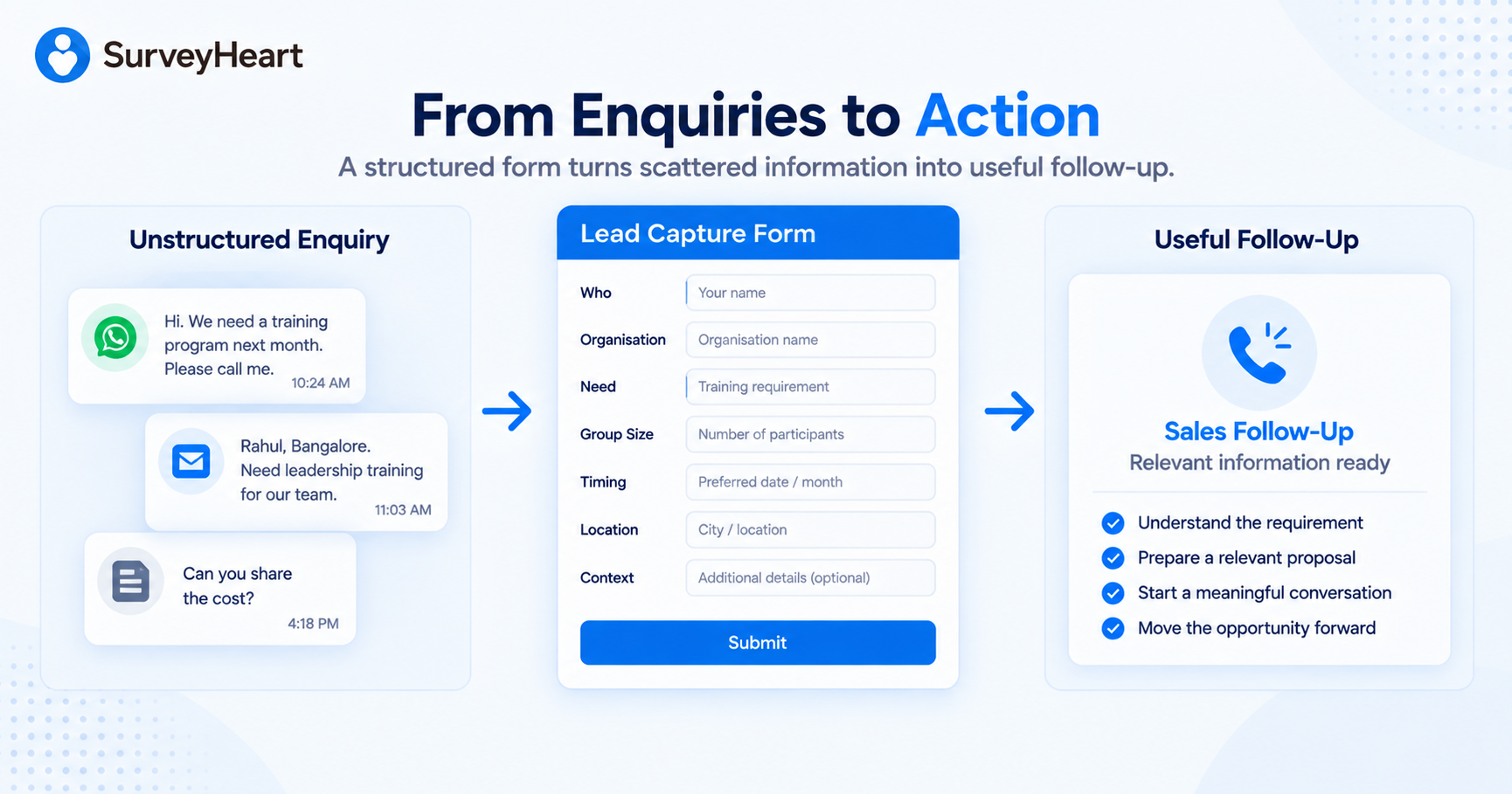
Imagine a small business that provides workplace training. Potential customers currently contact the company through email, WhatsApp, telephone calls and social media. Some people explain the requirement clearly. Others simply say: “Please send details.”
The sales team spends considerable time asking basic follow-up questions. The business therefore decides to create a structured enquiry form.
1. Define the Workflow
After submission: The sales team should know whether the enquiry is relevant and have enough information to conduct a useful first conversation.
2. Identify What Is Needed
- contact name
- organisation
- mobile number
- training requirement
- approximate participants
- preferred timeframe
- city or delivery preference
- special requirement
3. Help the Prospect Answer Properly
| Field | Example guidance |
|---|---|
| Training Requirement | Example: Communication skills for first-time managers |
| Number of Participants | Example: 25–30 |
| Preferred Timeframe | Example: November 2026 |
| Anything else we should know? | Example: Most participants were promoted to managerial roles during the last six months. |
The prospect now has a much clearer idea of what information will help the training company.
4. Remove Unnecessary Questions
The company initially considers asking about annual turnover, total employee count, LinkedIn profile and complete office address. None of these is necessary for the initial workflow. They are removed.
5. Use the Information
Who → Organisation → Need → Group Size → Timing → Location → Context
The first conversation can focus on the actual requirement rather than collecting basic information. The form has not merely digitised the enquiry. It has structured the information around the workflow that follows.
A Simple Framework for Better Online Forms
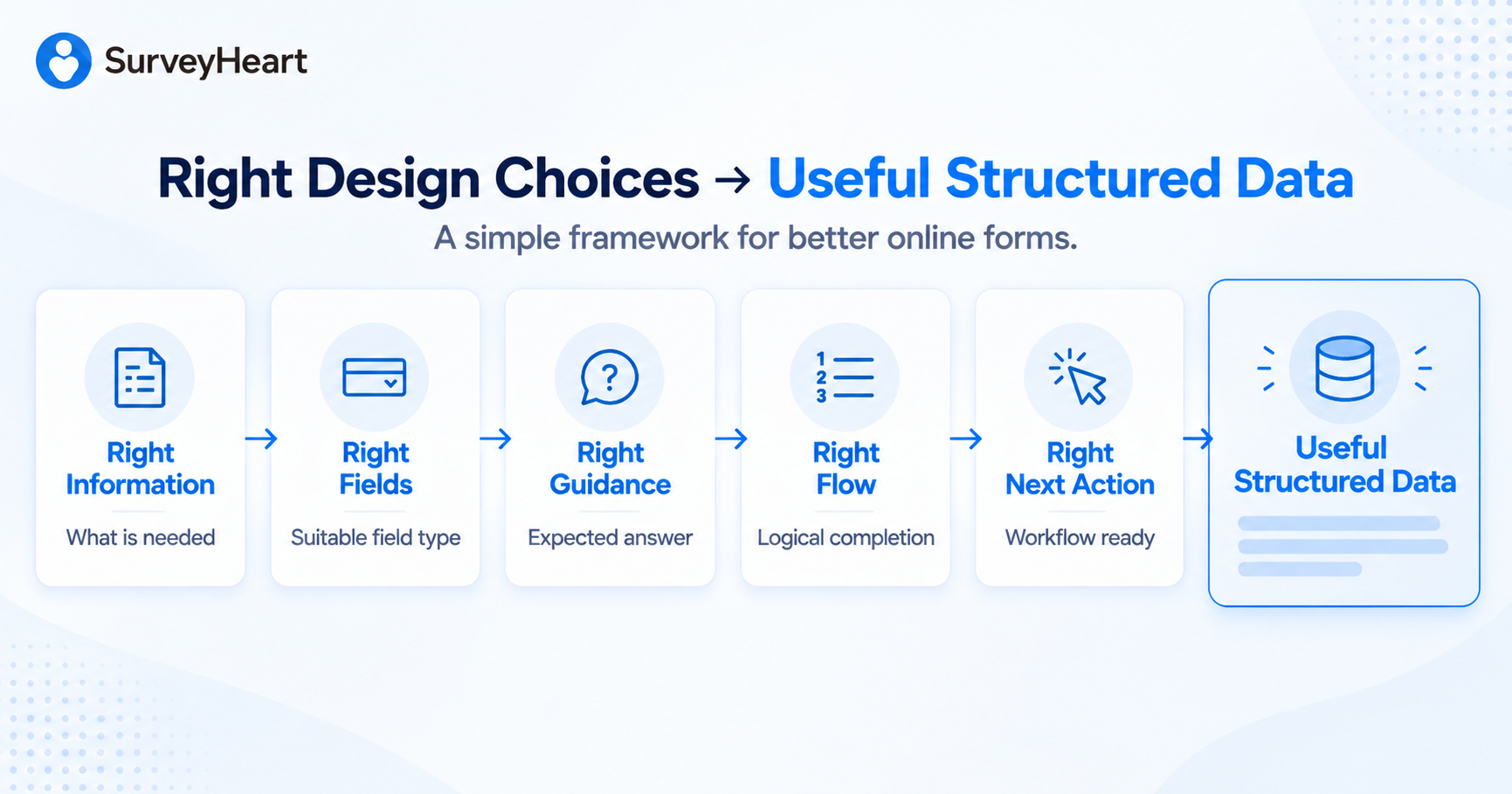
Before publishing a form, check five things.
1. Right Information
Are you collecting what is actually needed for the task or workflow?
2. Right Fields
Is each piece of information being collected using the most suitable field type?
3. Right Guidance
Does the respondent understand what kind of answer is expected?
4. Right Flow
Does the form feel logical and easy to complete?
5. Right Next Action
Will the submitted information allow the required task or workflow to move forward?
Right Information + Right Fields + Right Guidance + Right Flow + Right Next Action = Useful Structured Data
A form is successful when the information it collects is useful after the Submit button is pressed.
When Should You Use an Online Form?
An online form is particularly useful when:
- the same type of information must be collected repeatedly
- information needs to follow a consistent structure
- several people will submit similar types of information
- the information needs to be reviewed, filtered or processed
- a submission starts another task or workflow
- manual collection through messages, email or paper is creating inconsistency
Examples include:
- contact forms
- lead-generation forms
- registrations
- applications
- onboarding forms
- booking requests
- order requests
- service requests
- vendor information forms
- event confirmations
- internal request forms
A form may not be the best choice when the primary objective is to gather opinions from a group in order to make a decision. In that situation, a survey may be more appropriate.
Ready to Collect Structured Data?
SurveyHeart lets you build and share online forms on mobile and desktop, start from ready-to-use templates or create your own, and collect responses without artificial response limits under fair use.
Whether you are collecting enquiries, registrations, applications, onboarding information or operational requests, start by defining what needs to happen after the form is submitted.
Then collect exactly the information that workflow requires—and make it easy for people to give you the right information.